Muhammad Rafi Arsya
Back to Blog
Session 1 / 5
Finance PWA Single-File 2026

RafiFinance — Personal Finance Tracker

I built a complete personal finance app as a single HTML file — no server, no database, no framework. Just one file that runs anywhere and works offline.

Author
Muhammad Rafi Arsya
Published
June 2026
Stack
Vanilla JS · PWA · localStorage
Deployed at
finance.rafiarsya.com
RafiFinance
The Problem I Had

I kept losing track of my money. Not in a dramatic way — just the slow, quiet kind where you check your e-wallet and wonder where half of it went. I tried spreadsheets. I tried existing apps. They were either too complex, required an account, or just didn't work the way I think about money.

So I did what any developer does when they can't find the right tool — I built my own.

The constraint I set for myself: it had to be a single HTML file. No npm install. No build step. No server. Download it once, open it in a browser, and it just works.

That constraint turned out to be the most interesting engineering challenge of the whole project.

Why Single-File?

Most modern web apps have hundreds of files. A React app with a few features easily balloons to 50,000+ files in node_modules. Deploying it requires a build pipeline, a hosting platform, environment variables, and at least 3 configuration files before you write a single line of product code.

RafiFinance v4 is one file. Open it in Chrome, and you have a full finance app. The PWA manifest is embedded inline. The service worker registers from a blob URL. All 3,000+ lines of HTML, CSS, and JS live in one place.

Single-file apps are an underrated architecture for personal tools. Zero dependencies. Zero deployment overhead. Zero attack surface. And they work forever — no "this app no longer supports your browser" surprises.
Tech Stack
Vanilla JavaScript (ES2022) CSS Custom Properties Lucide Icons (CDN) Inter + JetBrains Mono localStorage (rfv4) PWA / Service Worker Cloudflare Pages Web Notifications API
Session 2 / 5

Features

Everything a personal finance tracker needs — and nothing it doesn't.

What RafiFinance Does
Transactions
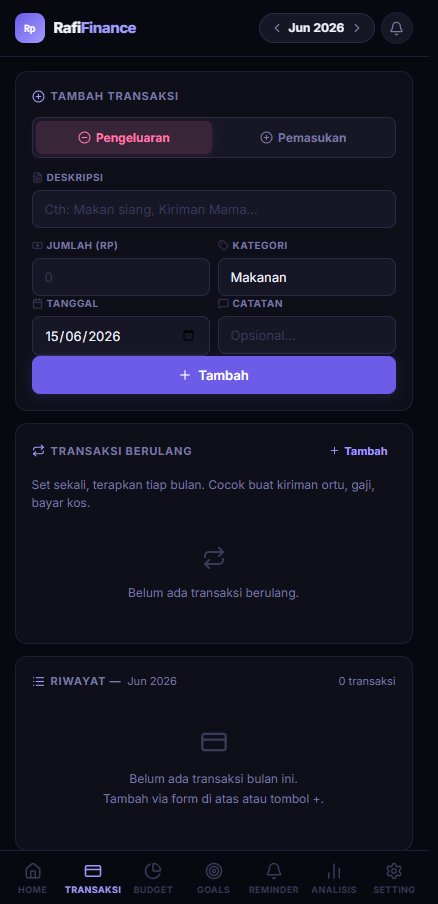
Log income and expenses with category, date, and notes. Filter and search across all history.
Budget Tracking
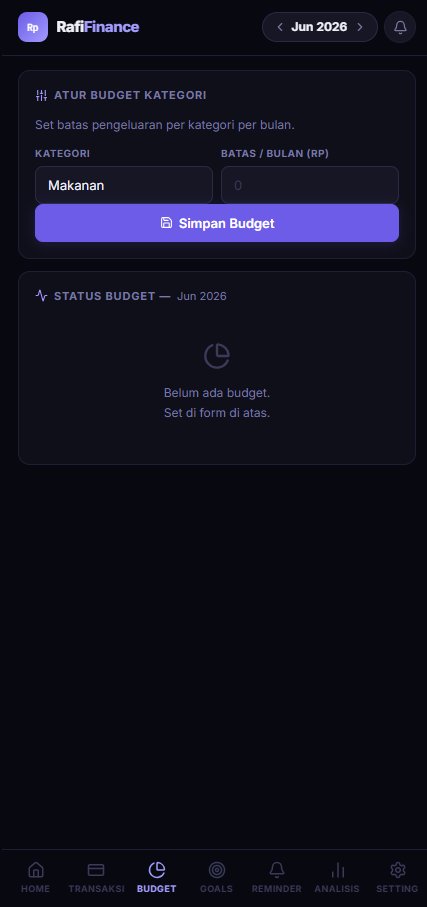
Set monthly budgets per category. Visual progress bars show you how close you are to the limit.
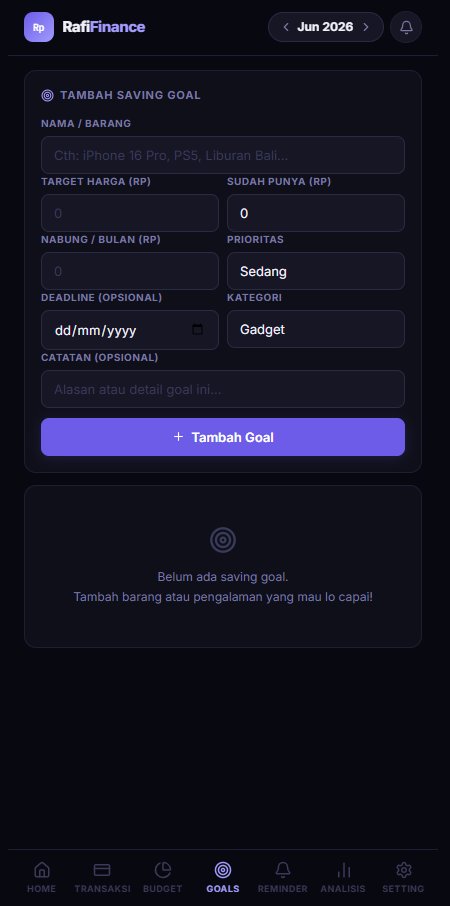
Saving Goals
Set a target amount and deadline. The app auto-calculates how much you need to save per month to hit it.
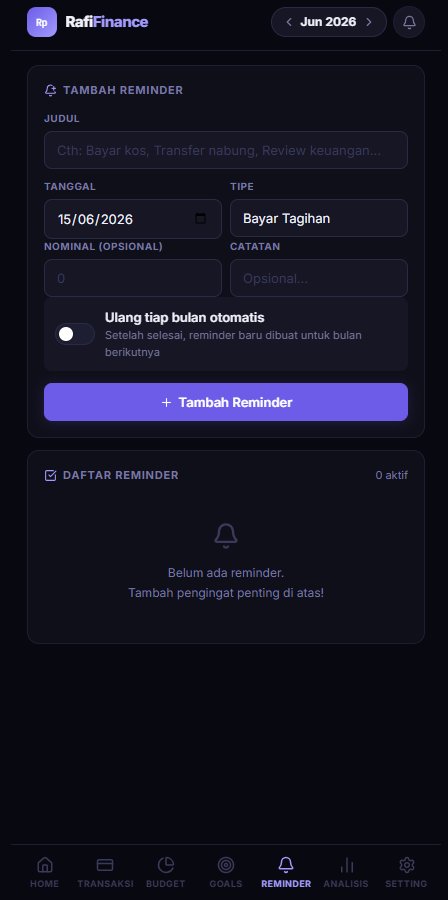
Recurring Reminders
Set recurring alerts for bills, subscriptions, or regular expenses. Browser notifications with configurable frequency.
6-Month Analysis
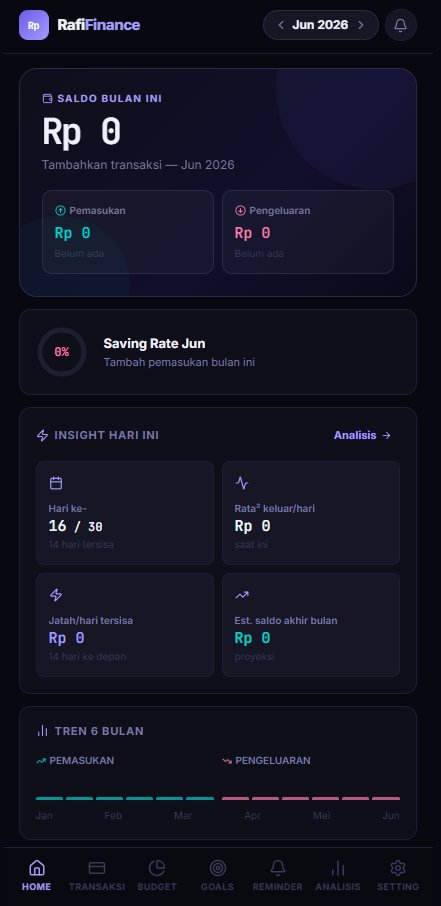
Visual breakdown of income vs expense trends across the last 6 months. Spending pattern insights by category.
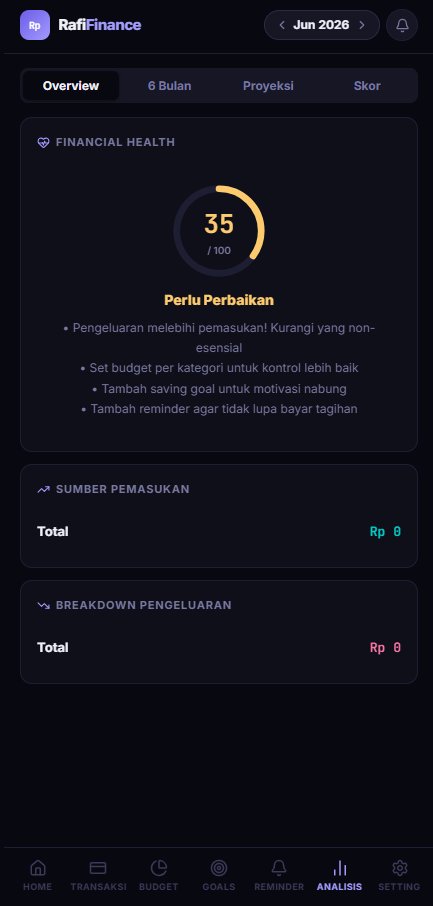
Financial Health Score
A 0–100 score based on your savings rate, budget adherence, and goal progress. Updates in real time.
Screenshots

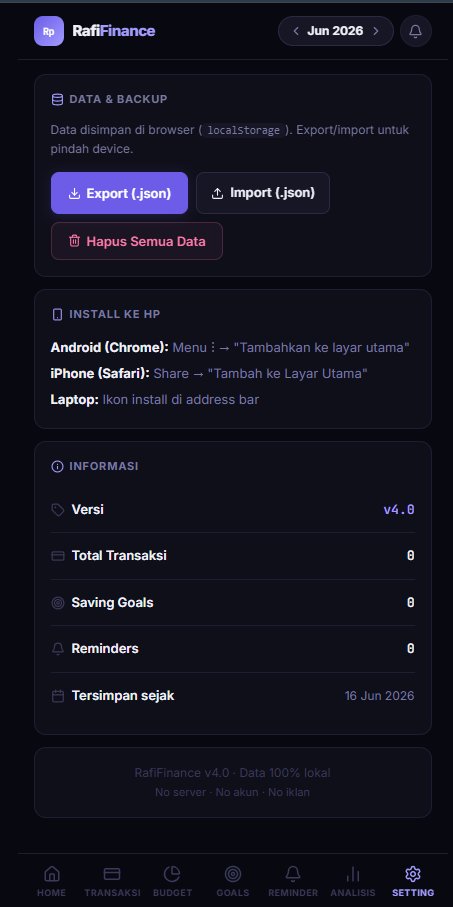
Here's what RafiFinance looks like in action — running on a real device at finance.rafiarsya.com.
Tap any screenshot to zoom in

Export / Import

All data exports as a single JSON file under the key rfv4. Import it on any device and your full history, budgets, and goals are restored instantly. No account. No sync. No server. Just a file.

This was a deliberate design choice. Your financial data is sensitive. It lives only on your device, in localStorage, and in a JSON file you control. Nowhere else.
Design Language

Dark theme with #080810 background and #6c5ce7 accent — a deep indigo-purple that felt right for something you look at every day. Inter for UI text, JetBrains Mono for numbers and amounts. Lucide icons from CDN for all iconography.

#6c5ce7
Accent Color
#080810
Background
Inter
UI Font
JB Mono
Number Font
Session 3 / 5

The Single-File Architecture

How do you fit a full-featured app into one HTML file — cleanly?

The Structure

A single HTML file can hold everything: markup, styles, and scripts. The trick is keeping it organized when it grows past 3,000 lines. Here's how RafiFinance v4 is structured:

1
<head> — fonts, PWA manifest inline
Google Fonts preconnect, Lucide CDN, embedded JSON manifest for PWA install, CSP meta.
2
<style> — all CSS (800+ lines)
CSS custom properties for theming, component styles, dark theme variables, responsive breakpoints.
3
<body> — HTML skeleton
App shell, navigation, modal templates, section containers. Minimal — actual content is rendered by JS.
4
<script> — all JS (1800+ lines)
State management, localStorage persistence, rendering functions, event handlers, service worker registration, and the financial health score algorithm — all vanilla JS.
State Management Without a Framework

Without React or Vue, I had to manage state manually. The approach was simple: one global state object, one render function per view, and a single save/load cycle to localStorage.

// Single source of truth let state = { transactions: [], budgets: [], goals: [], reminders: [] }; // Persist everything to localStorage function save() { localStorage.setItem('rfv4', JSON.stringify(state)); } // Hydrate on load function load() { const raw = localStorage.getItem('rfv4'); if (raw) state = JSON.parse(raw); } // Re-render after every mutation function addTransaction(tx) { state.transactions.push(tx); save(); renderTransactions(); renderDashboard(); }
The Financial Health Score Algorithm

The score (0–100) is computed from three weighted signals:

// Health Score = weighted average of 3 metrics // 1. Savings Rate (40% weight) const savingsRate = (income - expenses) / income; const savingsScore = Math.min(savingsRate / 0.20, 1) * 40; // 2. Budget Adherence (35% weight) const adherence = budgets.filter(b => b.spent <= b.limit).length / budgets.length; const budgetScore = adherence * 35; // 3. Goal Progress (25% weight) const avgProgress = goals.reduce((s, g) => s + g.saved / g.target, 0) / goals.length; const goalScore = Math.min(avgProgress, 1) * 25; const healthScore = Math.round(savingsScore + budgetScore + goalScore);
Session 4 / 5

PWA & Deployment

Making a single HTML file installable as a native-like app — and deploying it in minutes.

Making It a PWA

A Progressive Web App needs three things: a manifest, a service worker, and HTTPS. Getting all three into a single file took some creativity.

1
Manifest — embedded as JSON in a <link> tag
Instead of a separate manifest.json, the manifest is base64-encoded and embedded as a data: URL in the link rel="manifest" tag. No separate file needed.
2
Service Worker — registered from a Blob URL
The service worker code is defined as a string inside the HTML, converted to a Blob, and registered via URL.createObjectURL(). This lets a single-file app have a real SW without a separate sw.js.
3
HTTPS — handled by Cloudflare Pages
Cloudflare Pages serves the file with automatic HTTPS and global CDN distribution. Zero config, free tier.
Service Worker as Blob
// Inline service worker — no separate sw.js file const swCode = ` self.addEventListener('install', e => { e.waitUntil( caches.open('rfv4-v1').then(c => c.addAll(['/'])) ); }); self.addEventListener('fetch', e => { e.respondWith( caches.match(e.request).then(r => r || fetch(e.request)) ); }); `; const blob = new Blob([swCode], { type: 'application/javascript' }); const swUrl = URL.createObjectURL(blob); navigator.serviceWorker.register(swUrl);

This approach has one limitation: the service worker scope is restricted to the blob URL origin, not the page origin. But for a single-page app that only needs to cache itself, it works perfectly.

Deployment

The whole deployment is just pushing one file to a GitHub repo connected to Cloudflare Pages. The site is live at finance.rafiarsya.com — a subdomain on my personal domain, pointing to Cloudflare Pages via a CNAME.

1
File deployed
0
Build steps
RM0
Hosting cost
<5s
Deploy time
Session 5 / 5

What I Learned

Building the simplest possible thing — and still running into real engineering problems.

Constraints Are Creative

"Single file" sounds like a limitation. It turned out to be a design philosophy. Every decision had to justify itself against the question: does this need to be here? There's no room for bloat in 3,000 lines. Every feature either earned its place or got cut.

The single-file constraint forced me to write better code. When you can't hide complexity behind abstractions and folder structures, you have to actually understand what you're building.
Vanilla JS Is Underrated

I reached for React by default on every project. This time I deliberately didn't. Vanilla JS with a simple state object, a save() function, and manual DOM updates handled everything RafiFinance needed — without a 200ms hydration delay, without a virtual DOM diffing algorithm, without a build step.

For a personal tool with one user (me), the overhead of a framework was never justified. The right tool for this job was no framework at all.

Not every project needs React. Not every project needs a build pipeline. Some of the best software is the kind that just opens and works.
End of post