
Rafi Avatar Muhammad Rafi Arsya
Back to Blog
Session 1 / 6
RAG LLM Self-Hosted 2026

PaperMind — Local RAG Paper Analyzer

I built an AI that reads, understands, and answers questions about research papers — running entirely on my own hardware, with zero cloud dependency.

The Problem

Reading research papers is hard. A single paper can be 30+ pages of dense academic language, packed with methodology sections, statistical findings, and domain-specific terminology. For students — especially those not in the paper's field — it takes hours just to extract the core ideas.

Tools like ChatGPT can help, but they have a fundamental problem: they hallucinate. Ask ChatGPT about a specific paper it hasn't seen, and it will confidently invent details. It doesn't actually read your document — it guesses based on patterns from its training data.

What if the AI could actually read the paper first — then answer questions strictly based on what's written inside it?

That's the problem PaperMind solves. It's not a general-purpose AI. It's an AI that is grounded to your document — it can only answer based on what it actually reads from your PDF.

Why Self-Hosted?

Research papers often contain sensitive or unpublished work. Uploading them to a third-party API — OpenAI, Anthropic, Google — means your data leaves your machine and goes through someone else's servers.

PaperMind runs entirely locally. The LLM runs on my own Linux mini PC. The vector database lives on my own disk. No paper you upload ever leaves your network.

Zero cost. Zero data leakage. Zero cloud dependency. Everything runs on a RM800 mini PC sitting on my desk.
What PaperMind Can Do

Upload any academic PDF, then:

1
Ask anything about the paper
"What methodology was used?" · "What are the key findings?" · "What limitations did the authors mention?"
2
Generate a structured summary
Auto-extracts main topic, objectives, methodology, findings, and conclusions in one click.
3
Manage multiple papers
Upload and switch between multiple PDFs — each with its own indexed knowledge base.
PaperMind in Action

This is what a real conversation with PaperMind looks like — asking questions about my own CV PDF:

PaperMind · RAFI_ARSYA_CV.pdf · 10 chunks indexed
🧠
I've loaded RAFI_ARSYA_CV.pdf. What would you like to know about this paper?
10:42 AM
R
What is Rafi's full name and university?
10:43 AM
🧠
The name in this document is Muhammad Rafi Arsya, and he is a student at Universiti Malaya, Kuala Lumpur, Malaysia.
10:43 AM
— a few seconds later —
R
What are all the technical skills listed?
10:44 AM
🧠
Based on the document, the technical skills include:

Frontend: HTML5, CSS3, JavaScript (ES6+), TypeScript, React, Next.js, Tailwind CSS, Zustand, TanStack React Query

Backend: Node.js, Express.js, Python, Java, REST APIs, PostgreSQL, MySQL, Redis, Socket.IO, Sequelize ORM

AI / ML: TensorFlow, Keras, PyTorch, NumPy, OpenCV, MediaPipe

Cloud & DevOps: AWS (AIF-C01 certified), Docker, Docker Compose, Bash, NGINX, Kiro, Git, GitHub, Ubuntu Linux
10:44 AM
— switching topic —
R
What projects has he built?
10:45 AM
🧠
The document mentions these projects:

1. CampusBay — A full-stack containerized marketplace using React 18, Node.js, PostgreSQL, and Docker Compose with real-time Socket.IO chat and Stripe payments.

2. Crop Disease Detector — An image classification web app using MobileNetV2 transfer learning, deployed on Hugging Face Spaces.

3. HandGesture — A real-time hand gesture drawing app using MediaPipe and OpenCV, detecting 21 landmarks per hand.
10:45 AM
R
Does he have any AWS certifications?
10:46 AM
🧠
Yes. The document states he holds the AWS Certified AI Practitioner (AIF-C01) certification, completed via Udemy with Stephane Maarek in May 2026 (10.5 hours).
10:46 AM
R
What is his IELTS score?
10:47 AM
🧠
According to the document, his IELTS Academic overall band score is 5.5 (CEFR B2), obtained from British Council IDP in June 2025.
10:47 AM
R
What leadership roles has he held?
10:48 AM
🧠
The document lists these leadership and experience roles:

Head of Website Division — PPI Malaysia University Chapter (2025–Present)
Head of Department — IDFEST Art Exhibition, Universiti Malaya (2026–Present)
LARAS Transportation Team — Coordinated logistics for large-scale events (2026)
LARAS Field Committee — On-ground field operations and team deployment (2026)
10:48 AM

Every answer above came directly from the PDF — not from the model's training data. That's RAG in action.

Live Demo — Asking Questions

Here's a real screen recording of PaperMind answering questions about an uploaded PDF in real time:

PaperMind — Q&A mode. Asking questions about a PDF, answered by local Mistral/Phi3 running on self-hosted hardware.
Tech Stack Overview
React 18 FastAPI (Python) ChromaDB Ollama Mistral 7B / Phi3 Mini nomic-embed-text PyMuPDF LangChain Docker Compose Nginx Ubuntu Linux
Session 2 / 6

What is RAG?

Retrieval Augmented Generation — the technique that makes PaperMind actually read your document instead of guessing.

The Simple Explanation

Imagine you have a brilliant friend who has read millions of books — but they haven't read your specific research paper. If you ask them about it, they'll give you a confident but made-up answer.

Now imagine you hand them your paper first, highlight the relevant sections, then ask your question. Suddenly, they're giving you accurate, grounded answers — because they're reading from the actual source.

RAG = give the AI your document as context before asking the question. The AI answers based on what it actually reads — not what it guesses.
How RAG Works — Step by Step
1
Extract text from PDF
PyMuPDF reads every page and extracts all text content from your uploaded document.
2
Chunk the text
The text is split into overlapping chunks of ~800 characters. Overlap ensures context isn't lost at chunk boundaries.
3
Embed each chunk
Each chunk is converted into a vector (a list of numbers) using nomic-embed-text. Similar chunks produce similar vectors.
4
Store in ChromaDB
All vectors and their corresponding text chunks are stored in a local vector database.
5
Query time: find relevant chunks
When you ask a question, it's converted to a vector too. ChromaDB finds the 5 most similar chunks using cosine similarity.
6
Send to LLM with context
The relevant chunks + your question are sent to Mistral/Phi3. The LLM is instructed to answer only from the provided context.
RAG vs ChatGPT — Key Difference

ChatGPT answers from its training data — it doesn't actually read your PDF. RAG answers from your actual document content. The difference is critical for accuracy.

PaperMind will say "This information is not found in the paper" rather than invent an answer. Honesty over hallucination.
Session 3 / 6

The Architecture

Five services, one Docker Compose file — how PaperMind's components connect.

System Architecture
PaperMind — Service Flow
Browser
User
Nginx
Port 3001
React
Frontend
FastAPI
Backend
ChromaDB
Vectors
Ollama
LLM
Component Breakdown
FE
React 18 + Vite — Frontend
Clean dark UI with Lucide icons. Handles PDF upload, chat interface, and summary panel. Compiled to static files served by Nginx.
BE
FastAPI (Python) — Backend API
REST API with endpoints: /upload, /ask, /summarize, /papers, /paper (DELETE). Handles PDF processing, embedding, and LLM communication.
DB
ChromaDB — Vector Database
Persistent local vector store. Each paper's chunks are stored with metadata (paper_id, filename, chunk_index) for filtered retrieval.
AI
Ollama — Local LLM Runtime
Runs Mistral 7B or Phi3 Mini locally. Also runs nomic-embed-text for generating embeddings. Runs on host machine, accessible by Docker containers.
NX
Nginx — Reverse Proxy
Routes /api/* to FastAPI backend, serves React static files, handles all inbound traffic on port 3001.
The RAG Pipeline Code
# rag.py — Core RAG Engine def process_pdf(self, pdf_path, filename): text = self._extract_text(pdf_path) # PyMuPDF chunks = self._chunk_text(text) # 800 chars, 100 overlap for chunk in chunks: embedding = self._embed(chunk) # nomic-embed-text self.collection.add( # → ChromaDB ids=[chunk_id], embeddings=[embedding], documents=[chunk], metadatas=[{"paper_id": paper_id}] ) def ask(self, question, paper_id): query_embedding = self._embed(question) results = self.collection.query( # cosine similarity search query_embeddings=[query_embedding], n_results=5, where={"paper_id": paper_id} ) context = "\n\n".join(results["documents"][0]) response = ollama.chat( # → Mistral / Phi3 model=self.model, messages=[{"role": "user", "content": prompt}] ) return response["message"]["content"]
Session 4 / 6

Building It

The challenges, decisions, and problems I ran into while building PaperMind from scratch.

Challenge 1 — Campus Firewall

My mini PC is hosted on Universiti Malaya's campus network. The campus firewall blocks all outbound traffic on non-standard ports — including npm install, pip install, and Docker pulls.

This meant I couldn't install dependencies directly on the Linux server. My workaround:

1
Download everything on Windows (RTX 5070 Ti machine)
Run npm install, docker pull, and ollama pull on the Windows machine which has unrestricted internet.
2
Transfer via SCP to Linux server
scp node_modules/, docker save → .tar files, and .ollama/models/ all transferred over LAN at ~110 MB/s.
3
Load Docker images and Ollama models locally
docker load -i node-alpine.tar on Linux, then copy Ollama model blobs to /home/ollama/.ollama/models/.
Challenge 2 — Ollama Not Accessible from Docker

By default, Ollama listens on 127.0.0.1:11434 — localhost only. Docker containers can't reach localhost of the host machine.

# Problem: Ollama only listening on localhost LISTEN 0 4096 127.0.0.1:11434 0.0.0.0:* # Fix: Set OLLAMA_HOST to listen on all interfaces Environment="OLLAMA_HOST=0.0.0.0:11434" # Result: Now accessible from Docker containers LISTEN 0 4096 *:11434 *:*

Also needed to allow UFW firewall to permit Docker's subnet to reach port 11434:

sudo ufw allow from 172.0.0.0/8 to any port 11434
Challenge 3 — Nginx Timeout

Mistral 7B on a CPU-only machine takes 2–5 minutes to generate a response. The default Nginx proxy timeout is 60 seconds — causing every request to fail with 504 Gateway Timeout.

# nginx/default.conf — Extended timeouts for LLM responses location /api/ { proxy_pass http://backend:8000/; proxy_read_timeout 300; proxy_connect_timeout 300; proxy_send_timeout 300; }
Challenge 4 — Model Speed on CPU

Mistral 7B uses ~8GB RAM and takes 2–5 minutes per response on CPU-only hardware. For a portfolio demo, this is too slow.

I switched to Phi3 Mini — Microsoft's 2.2GB model that runs in 30–60 seconds on the same hardware, while still giving accurate, structured answers.

Trade-off: Phi3 Mini is less detailed than Mistral 7B, but for a demo environment, speed matters more than depth.
Session 5 / 6

Self-Hosting

Why running AI on your own hardware is more impressive than paying for an API — and what I learned from it.

The Setup

PaperMind runs on a Linux mini PC sitting on my desk at Kolej Kediaman Ke-13, Universiti Malaya. Everything — the React frontend, FastAPI backend, ChromaDB vector database, and Mistral LLM — runs on this single machine.

16GB
RAM
512GB
Storage
0
Cloud Cost (RM)
100%
Private
Why Self-Hosting Matters

Most students build projects that call OpenAI's API — they pay per token, their data goes through external servers, and if OpenAI goes down, their app goes down.

PaperMind is different. The LLM lives on my disk. The vector database lives on my disk. Nothing leaves the machine. This demonstrates a different and more advanced skill set: infrastructure thinking.

Running a 4.4GB language model on your own hardware, solving firewall constraints, managing Docker networking, and configuring systemd services — this is real DevOps, not just coding.
Docker Compose Stack
# docker-compose.yml — PaperMind Stack services: backend: build: ./backend container_name: papermind_backend environment: - OLLAMA_HOST=http://host.docker.internal:11434 extra_hosts: - "host.docker.internal:host-gateway" frontend: image: nginx:alpine container_name: papermind_frontend volumes: - ./frontend/dist:/usr/share/nginx/html nginx: image: nginx:alpine container_name: papermind_nginx ports: - "3001:80" # CampusBay uses 80 & 3000
What Runs Alongside PaperMind

The same mini PC also runs CampusBay — my peer-to-peer student marketplace with React, Node.js, PostgreSQL, Redis, Socket.IO, and Stripe. Both stacks coexist on the same machine via Docker Compose with careful port management.

CampusBay (Port 80) PaperMind (Port 3001) Ollama (Port 11434) PostgreSQL (Port 5432) Redis (Port 6379) Cloudflare Tunnel
Live Demo — Auto Summary

One click generates a full structured summary of the paper — main topic, objectives, methodology, findings, and conclusion — entirely from the local LLM:

PaperMind — Summary mode. One-click structured summary generated by Phi3 Mini running locally.
Summary Output — Screenshot

This is what the summary looks like for a real CV PDF — the AI correctly identifies main topic, objectives, methodology, key findings, and conclusion from the document content:
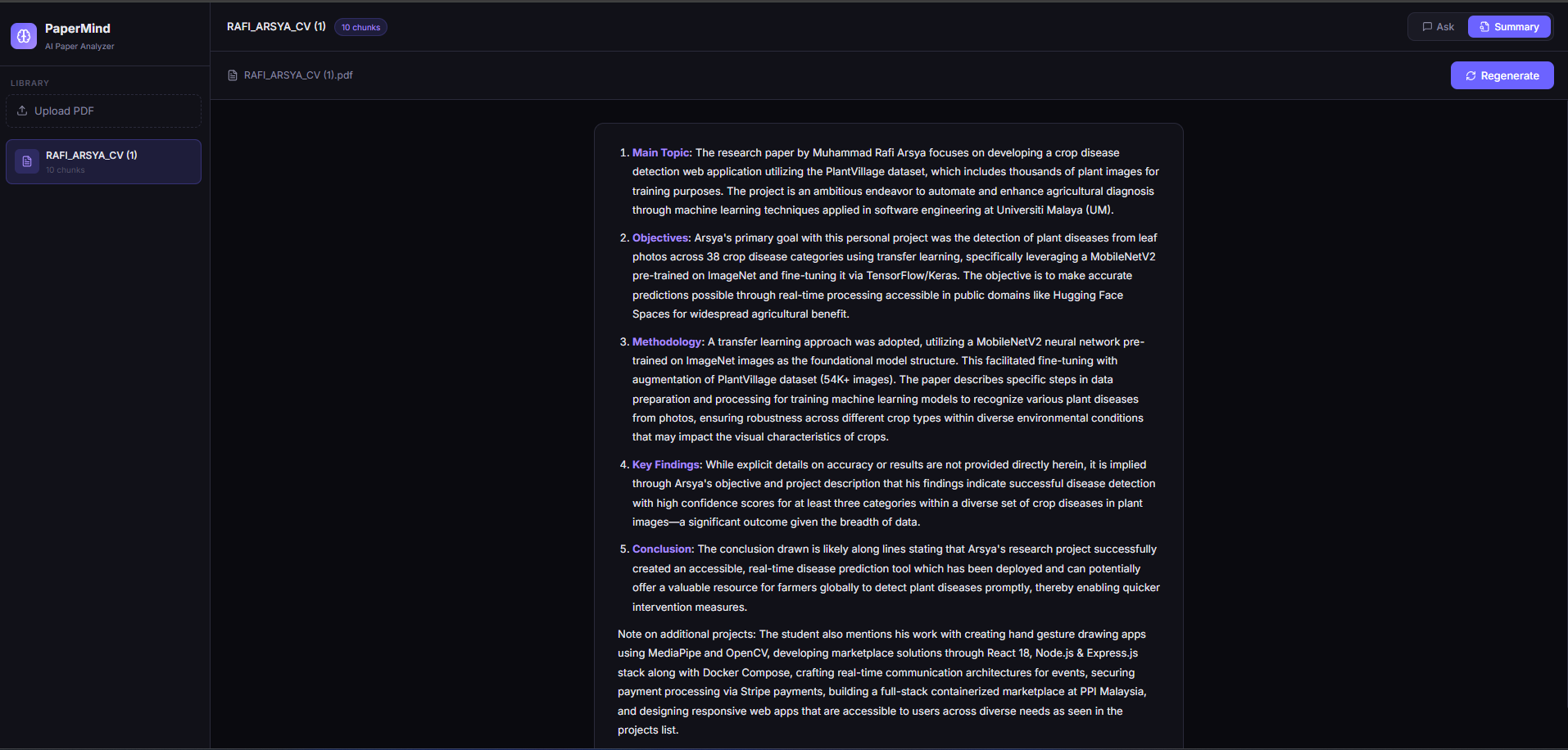
PaperMind summary output showing structured analysis of RAFI_ARSYA_CV.pdf
PaperMind Summary output — structured 5-point analysis generated from RAFI_ARSYA_CV.pdf. All answers grounded in the document.
Session 6 / 6

What's Next

What I learned, what I'd improve, and where PaperMind goes from here.

What I Learned

PaperMind taught me that building an AI application is not the same as using AI. Using ChatGPT is easy. Building the infrastructure that makes a grounded, private, self-hosted AI work — that's a different skill entirely.

The hardest parts weren't the AI. They were the firewall, the Docker networking, the Ollama systemd configuration, and the Nginx timeouts. Real engineering is mostly infrastructure.
What I Would Improve
1
Streaming responses
Currently the UI waits for the full response before showing anything. Streaming would make it feel much faster.
2
GPU acceleration
A dedicated GPU would bring response time from 2–5 minutes to 5–10 seconds. Night and day for user experience.
3
Citation highlighting
Show which exact chunk of the paper each answer came from — so users can verify the source.
4
Multi-document comparison
Ask a question across multiple papers simultaneously — useful for literature reviews.
End of post