
PaperMind — Local RAG Paper Analyzer
I built an AI that reads, understands, and answers questions about research papers — running entirely on my own hardware, with zero cloud dependency.
Reading research papers is genuinely hard. A single paper can run 30+ pages of dense academic language — methodology sections written for specialists, statistical findings buried in footnotes, citations that assume you've already read 40 other papers. For a first-year SE student crossing into ML, biology, or systems research? It's a wall.
The obvious solution is to ask ChatGPT. And ChatGPT will happily answer — confidently, fluently, and sometimes completely wrong. That's the hallucination problem: a general-purpose LLM doesn't actually read your PDF. It guesses based on patterns from training data. It will invent author names, fabricate statistics, and describe methodology that doesn't exist in the paper you gave it.
That's the core problem RAG solves, and what PaperMind is built on. It's not a general-purpose AI. It's an AI that is grounded to your document — every answer is traced back to a real chunk of text from your PDF. If it's not in the paper, it won't say it.
Research papers — especially unpublished drafts — are intellectual property. Uploading them to OpenAI or Google means their servers process, log, and potentially train on your data. That's a real privacy concern, not a theoretical one.
There's also the cost problem. GPT-4 charges per token. At the volume you'd use a daily paper-reading tool, that adds up fast — especially for a student. Cloud also means single point of failure: API down or paywalled means your tool stops working.
PaperMind sidesteps all of this. The LLM runs on my own Linux mini PC via Ollama. The vector database lives on my own disk via ChromaDB. No paper you upload ever leaves your local network.
Upload any academic PDF, then:
This is what a real conversation with PaperMind looks like — asking questions about my own CV PDF:
Frontend: HTML5, CSS3, JavaScript (ES6+), TypeScript, React, Next.js, Tailwind CSS, Zustand, TanStack React Query
Backend: Node.js, Express.js, Python, Java, REST APIs, PostgreSQL, MySQL, Redis, Socket.IO, Sequelize ORM
AI / ML: TensorFlow, Keras, PyTorch, NumPy, OpenCV, MediaPipe
Cloud & DevOps: AWS (AIF-C01 certified), Docker, Docker Compose, Bash, NGINX, Kiro, Git, GitHub, Ubuntu Linux
1. CampusBay — A full-stack containerized marketplace using React 18, Node.js, PostgreSQL, and Docker Compose with real-time Socket.IO chat and Stripe payments.
2. Crop Disease Detector — An image classification web app using MobileNetV2 transfer learning, deployed on Hugging Face Spaces.
3. HandGesture — A real-time hand gesture drawing app using MediaPipe and OpenCV, detecting 21 landmarks per hand.
• Head of Website Division — PPI Malaysia University Chapter (2025–Present)
• Head of Department — IDFEST Art Exhibition, Universiti Malaya (2026–Present)
• LARAS Transportation Team — Coordinated logistics for large-scale events (2026)
• LARAS Field Committee — On-ground field operations and team deployment (2026)
Every answer above came directly from the PDF — not from the model's training data. That's RAG in action.
Here's a real screen recording of PaperMind answering questions about an uploaded PDF in real time:
What is RAG?
Retrieval Augmented Generation — the technique that makes PaperMind actually read your document instead of guessing.
Imagine you have a brilliant friend who has read millions of books — but they haven't read your specific research paper. If you ask them about it, they'll give you a confident but made-up answer.
Now imagine you hand them your paper first, highlight the relevant sections, then ask your question. Suddenly, they're giving you accurate, grounded answers — because they're reading from the actual source.
ChatGPT answers from its training data — it doesn't actually read your PDF. RAG answers from your actual document content. The difference is critical for accuracy.
The Architecture
Five services, one Docker Compose file — how PaperMind's components connect.
Building It
The challenges, decisions, and problems I ran into while building PaperMind from scratch.
My mini PC is hosted on Universiti Malaya's campus network. The campus firewall blocks all outbound traffic on non-standard ports — including npm install, pip install, and Docker pulls.
This meant I couldn't install dependencies directly on the Linux server. My workaround:
By default, Ollama listens on 127.0.0.1:11434 — localhost only. Docker containers can't reach localhost of the host machine.
Also needed to allow UFW firewall to permit Docker's subnet to reach port 11434:
Mistral 7B on a CPU-only machine takes 2–5 minutes to generate a response. The default Nginx proxy timeout is 60 seconds — causing every request to fail with 504 Gateway Timeout.
Mistral 7B uses ~8GB RAM and takes 2–5 minutes per response on CPU-only hardware. For a portfolio demo, this is too slow.
I switched to Phi3 Mini — Microsoft's 2.2GB model that runs in 30–60 seconds on the same hardware, while still giving accurate, structured answers.
Self-Hosting
Why running AI on your own hardware is more impressive than paying for an API — and what I learned from it.
PaperMind runs on a Linux mini PC sitting on my desk at Kolej Kediaman Ke-13, Universiti Malaya. Everything — the React frontend, FastAPI backend, ChromaDB vector database, and Mistral LLM — runs on this single machine.
Most students build projects that call OpenAI's API — they pay per token, their data goes through external servers, and if OpenAI goes down, their app goes down.
PaperMind is different. The LLM lives on my disk. The vector database lives on my disk. Nothing leaves the machine. This demonstrates a different and more advanced skill set: infrastructure thinking.
The same mini PC also runs CampusBay — my peer-to-peer student marketplace with React, Node.js, PostgreSQL, Redis, Socket.IO, and Stripe. Both stacks coexist on the same machine via Docker Compose with careful port management.
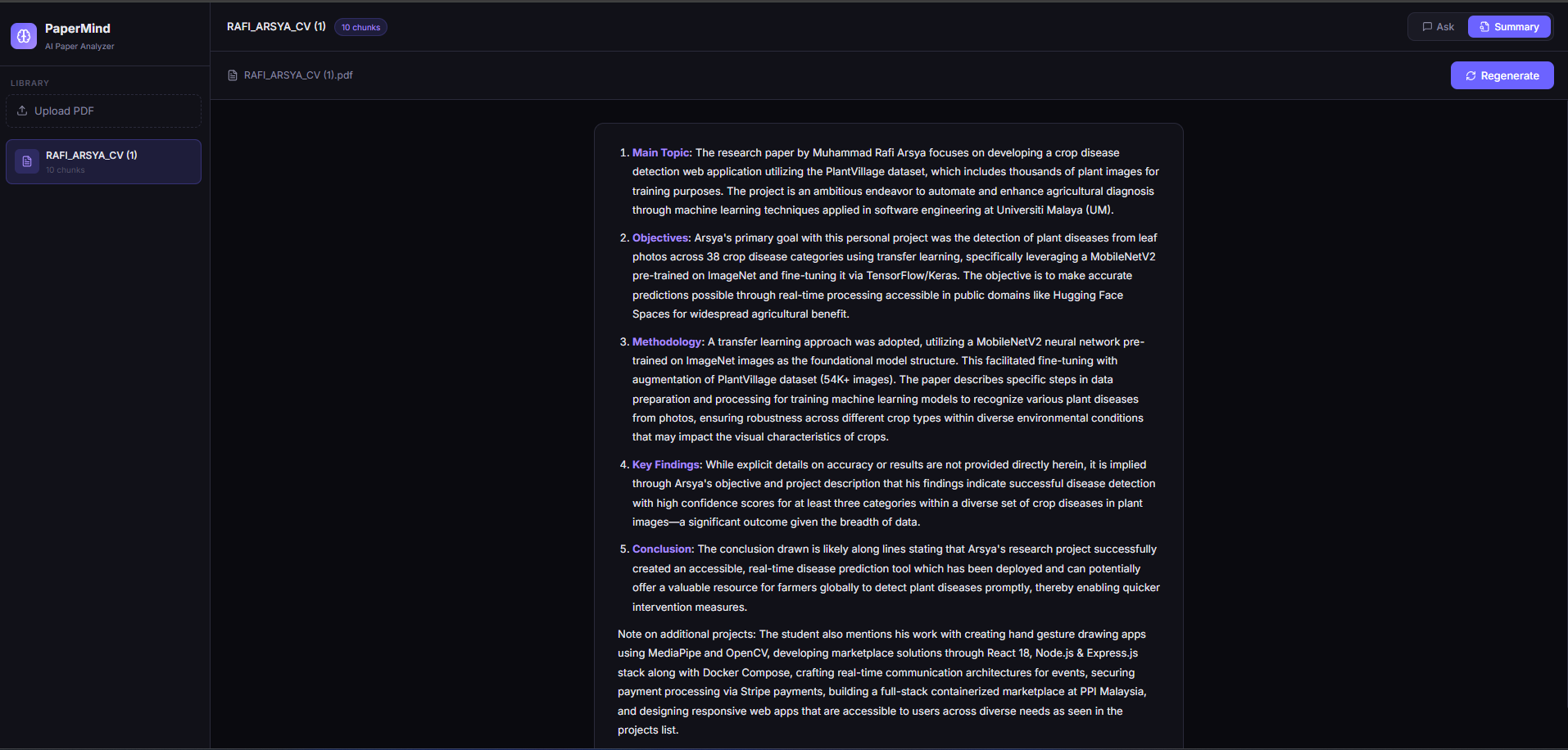
One click generates a full structured summary of the paper — main topic, objectives, methodology, findings, and conclusion — entirely from the local LLM:
This is what the summary looks like for a real CV PDF — the AI correctly identifies main topic, objectives, methodology, key findings, and conclusion from the document content:
What's Next
What I learned, what I'd improve, and where PaperMind goes from here.
PaperMind taught me that building an AI application is not the same as using AI. Using ChatGPT is easy. Building the infrastructure that makes a grounded, private, self-hosted AI work — that's a different skill entirely.